
GPT 图像 · Responses
用 gpt-6-astra 的 image_generation 工具在 Responses 流式里出图:全参数、事件序列、revised_prompt、参考图与蒙版编辑、一次多张、Vision 理解与多语言文字渲染。适合对话式多轮编辑
POST /v1/responses
GPT 图像的第二套入口:主线模型 gpt-6-astra 理解意图、自动优化提示词,再调度 image_generation 工具出图,SSE 流式回传、心跳保活。
它的价值在对话式多轮编辑和自动 revised_prompt;但它无法指定图像模型,size / quality 会被改写——要 4K/high 实得 1536×1024/medium。
默认生图请用 Image API,那边按请求精确返回 4K。
本页结论来自对本网关的真实调用,最后验证:2026-09-12。
基本调用
请求发出后约 3~4 秒即开始回传事件,读流式响应时客户端超时建议设到 300 秒以上。
curl -N -sS "https://www.vibeapi.cn/v1/responses" \
  -H "Authorization: Bearer $API_KEY" \
  -H "Content-Type: application/json" \
  -d '{
    "model": "gpt-6-astra",
    "input": "一只灰色虎斑猫抱着戴橙色围巾的水獭,温暖的童书插画风格",
    "stream": true,
    "tools": [{"type": "image_generation"}]
  }'
from openai import OpenAI
import base64
client = OpenAI(base_url="https://www.vibeapi.cn/v1", api_key="YOUR_API_KEY")
stream = client.responses.create(
model="gpt-6-astra",
input="一只灰色虎斑猫抱着戴橙色围巾的水獭,温暖的童书插画风格",
tools=[{"type": "image_generation"}],
stream=True,
)
for event in stream:
if event.type == "response.image_generation_call.partial_image":
with open("out.png", "wb") as f:
f.write(base64.b64decode(event.partial_image_b64))
print("已生成 out.png")import OpenAI from "openai";
import fs from "fs";
const client = new OpenAI({
baseURL: "https://www.vibeapi.cn/v1",
apiKey: "YOUR_API_KEY",
});
const stream = await client.responses.create({
model: "gpt-6-astra",
input: "一只灰色虎斑猫抱着戴橙色围巾的水獭,温暖的童书插画风格",
tools: [{ type: "image_generation" }],
stream: true,
});
for await (const event of stream) {
if (event.type === "response.image_generation_call.partial_image") {
fs.writeFileSync("out.png", Buffer.from(event.partial_image_b64, "base64"));
}
}图片数据位于 response.image_generation_call.partial_image 事件的 partial_image_b64 字段(base64 编码)。完整事件序列见流式事件序列。
实测输出(约 30 秒):

与 Image API 的差异
| Responses(本页) | Image API | |
|---|---|---|
| 调用模型 | gpt-6-astra,内部调度图像模型,无法指定 | gpt-image-2,直接指定 |
size / quality | 被改写:要 4K/high 实得 1536×1024/medium | 按请求执行 |
| 耗时 | 40–170 秒 | 4K + high 约 45–57 秒 |
| 提示词优化 | 自动,返回 revised_prompt | 无 |
| 多轮编辑 | 支持,上下文携带图片 | 不支持 |
| 参考图 | URL / base64 / file_id;URL 由上游主动下载 | multipart 文件上传 |
| 返回 | SSE 事件里的 base64;非流式在 output[].result | data[0].b64_json 或 url |
| 流式 | 支持,心跳保活,大图不中断 | 同步返回 |
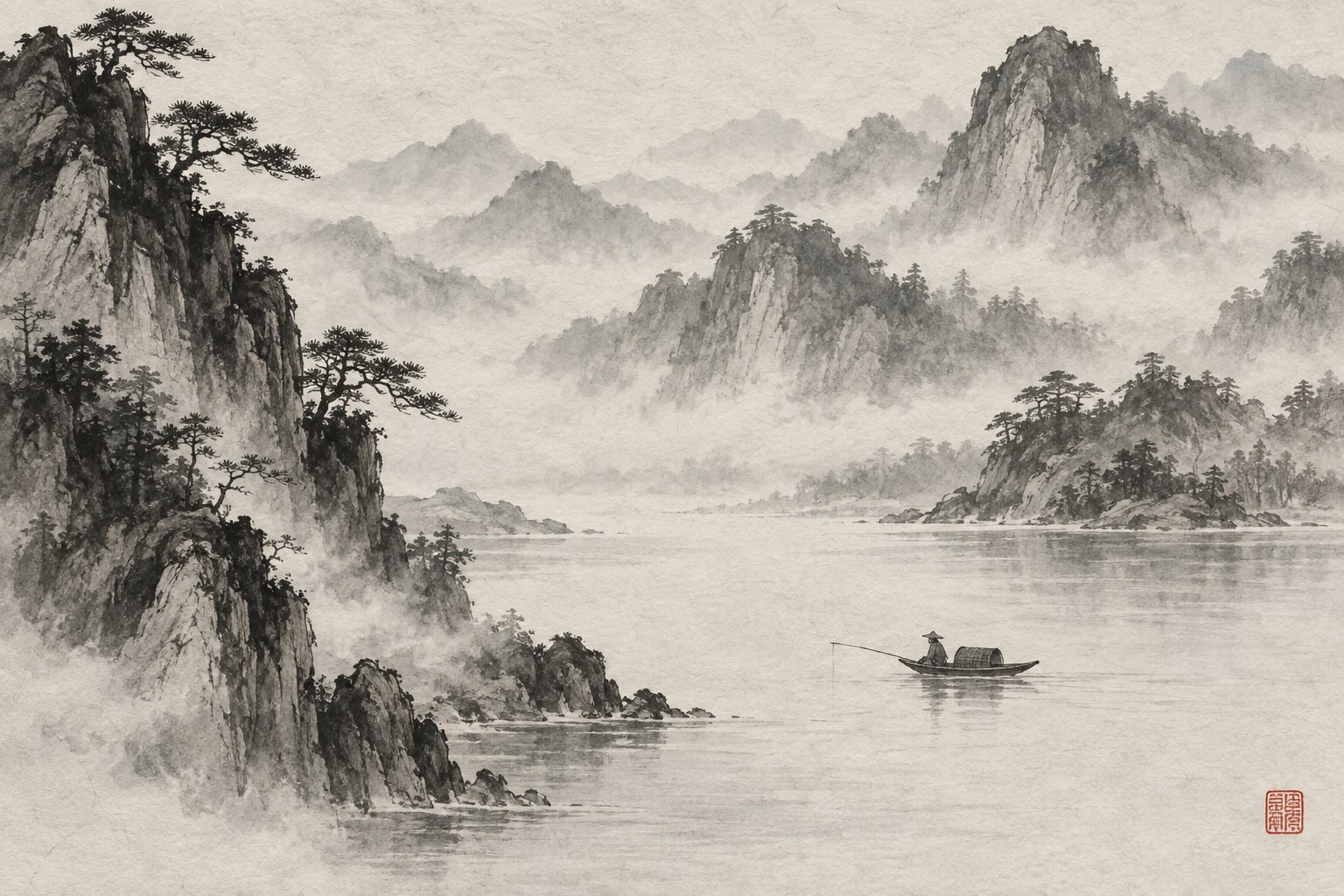
实测:同样请求 3840x2160 + high,三个主题都被降到 1536×1024 / medium:
| 主题 | 耗时 | 实返 size / quality |
|---|---|---|
| 东方水墨 | 40.2 s | 1536x1024 / medium |
| 工笔重彩 | 166.7 s | 1536x1024 / medium |
| 仙侠 | 171.4 s | 1536x1024 / medium |


请求结构
POST https://www.vibeapi.cn/v1/responses
Authorization: Bearer <API_KEY>
Content-Type: application/json
顶层请求字段:
| 字段 | 类型 | 必填 | 默认 | 说明 |
|---|---|---|---|---|
model | string | 是 | — | 主线模型,生成图片固定使用 gpt-6-astra |
input | string | array | 是 | — | 用户输入。字符串表示纯文本;数组表示多模态(文本 + 图片)。详见 input 字段详解 |
tools | array | 是(生图) | — | 内置工具列表,生成图片须包含 {"type":"image_generation"}。详见 image_generation 工具参数 |
stream | boolean | 否 | false | true 启用 SSE 流式(推荐);false 一次性返回完整 JSON |
instructions | string | 否 | — | 系统级指令。可选,不传也能正常生成 |
previous_response_id | string | 否 | — | 关联上一次响应以实现多轮。本网关不支持,见多轮编辑 |
最小请求(字符串形式的 input):
{
  "model": "gpt-6-astra",
  "input": "a red apple on a wooden table",
  "stream": true,
  "tools": [{ "type": "image_generation" }]
}
完整请求(数组形式的 input + 全参数工具):
{
  "model": "gpt-6-astra",
  "instructions": "You are a helpful image generation assistant.",
  "input": [
    { "role": "user", "content": [{ "type": "input_text", "text": "Draw a watercolor winter landscape" }] }
  ],
  "stream": true,
  "tools": [
    {
      "type": "image_generation",
      "quality": "high",
      "size": "1536x1024",
      "output_format": "webp",
      "output_compression": 50,
      "moderation": "low",
      "partial_images": 2
    }
  ]
}
input 字段
input 有两种写法,本网关均已对齐 OpenAI 协议:
写法一,字符串(最简,纯文本生成):
"input": "a red apple on a wooden table"写法二,数组(多模态,文本 + 参考图,编辑与 Vision 必用):
"input": [
  {
    "role": "user",
    "content": [
      { "type": "input_text",  "text": "把这张图改成水彩风格" },
      { "type": "input_image", "image_url": "https://.../photo.jpg" }
    ]
  }
]
content 数组中每个 part 的类型:
| part 类型 | 字段 | 说明 |
|---|---|---|
input_text | text(string) | 文本指令 |
input_image | image_url(string) | 参考图:公网 URL,或 data:image/...;base64,... data URI |
input_image | file_id(string) | 参考图:经 Files API 上传后得到的文件 ID |
input_image | detail(string) | 仅图片理解时使用,控制理解精度,见 Vision 图片理解 |
一个 content 数组可包含多个 input_image(多参考图)。三种参考图写法的完整示例见 多轮编辑与参考图输入。
image_generation 工具参数
生成能力通过 tools 数组中的 image_generation 对象配置。逐字段说明如下:
| 字段 | 类型 | 取值 | 默认 | 说明 |
|---|---|---|---|---|
type | string | "image_generation" | — | 必填,固定值,声明启用生成工具 |
quality | string | low / medium / high / auto | auto | 渲染质量。low 最快(草稿、缩略图),high 最精细(耗时最长) |
size | string | 同 Image API 的尺寸约束 | auto | 期望尺寸;本网关会改写,以响应实际尺寸为准 |
output_format | string | png / jpeg / webp | png | 输出格式。Responses 工具遵循该参数(实测 webp 返回真正的 WebP) |
output_compression | number | 0–100 | — | 压缩级别(仅 jpeg / webp)。50 表示压缩 50% |
moderation | string | auto / low | auto | 内容审核强度,low 更宽松 |
action | string | auto / generate / edit | auto | 强制生成或编辑,详见下文与 多轮编辑与参考图输入 |
partial_images | number | 0–3 | — | 流式过程中下发的中间预览帧数。0 表示只下发最终图 |
input_image_mask | object | {"file_id": "..."} | — | 蒙版编辑,蒙版区域被重绘,详见 多轮编辑与参考图输入 |
逐字段示例:
quality——三档质量(其余参数固定):
{ "type": "image_generation", "quality": "low" }     // 快,草稿
{ "type": "image_generation", "quality": "high" }    // 慢,成片
output_format + output_compression——输出 WebP 并压缩 50%:
{ "type": "image_generation", "output_format": "webp", "output_compression": 50 }moderation——放宽审核:
{ "type": "image_generation", "moderation": "low" }action——强制行为(默认 auto 由模型自行决定生成还是编辑):
{ "type": "image_generation", "action": "generate" }  // 总是新建图片
{ "type": "image_generation", "action": "edit" } // 强制编辑上下文中的图片;无图则报错partial_images——流式下发 2 帧中间预览:
{ "type": "image_generation", "partial_images": 2 }全参数组合的真实请求与响应见流式事件序列;size / quality 在本页会被改写,见与 Image API 的差异。
流式与非流式
流式 stream:true(推荐) | 非流式 stream:false | |
|---|---|---|
| 返回 | SSE 事件流,逐帧回传 | 一次性完整 JSON |
| 取图 | partial_image 事件的 partial_image_b64 | output[] 中 image_generation_call.result |
| 首字节 | 3~4 秒 | 渲染完成后才返回 |
| 大图 / high | 心跳保活,不中断 | 存在 504 风险 |
| 实测耗时 | — | 约 80~140 秒(medium 1K) |
读流式响应时,客户端超时建议设到 300 秒以上:大图渲染常要好几分钟,默认的短超时(比如 60 秒)会把请求自己掐断,反而拿不到图。
非流式真实响应结构(gpt-6-astra + medium,result 已截断):
{
  "id": "resp_0bb33694b11513cf016a3d4bb1d4a0819b918d29bc82aa4358",
  "object": "response",
  "status": "completed",
  "model": "gpt-6-astra",
  "output": [
    {
      "id": "ig_0bb33694b11513cf016a3d4bbb4b54819b9ba7731790d4d87d",
      "type": "image_generation_call",
      "status": "generating",
      "action": "generate",
      "background": "opaque",
      "output_format": "png",
      "quality": "medium",
      "result": "iVBORw0KGgoAAAANSU...<3493728 字节 base64>",
      "revised_prompt": "Oil painting still life...<407 字符>",
      "size": "1400x1123"
    },
    { "type": "message", "role": "assistant", "content": [{ "type": "output_text", "text": "" }] }
  ],
  "reasoning": { "effort": "medium" },
  "service_tier": "default",
  "store": false
}
非流式取图代码:
resp = client.responses.create(
    model="gpt-6-astra",
    input="An oil painting still life of fruit and wine, Rembrandt lighting",
    tools=[{"type": "image_generation", "quality": "medium"}],
)
for item in resp.output:
    if item.type == "image_generation_call":
        with open("out.png", "wb") as f:
            f.write(base64.b64decode(item.result))
        print("revised_prompt:", item.revised_prompt)
        print("实际尺寸:", item.size)   # 实际尺寸由上游裁定,与请求不同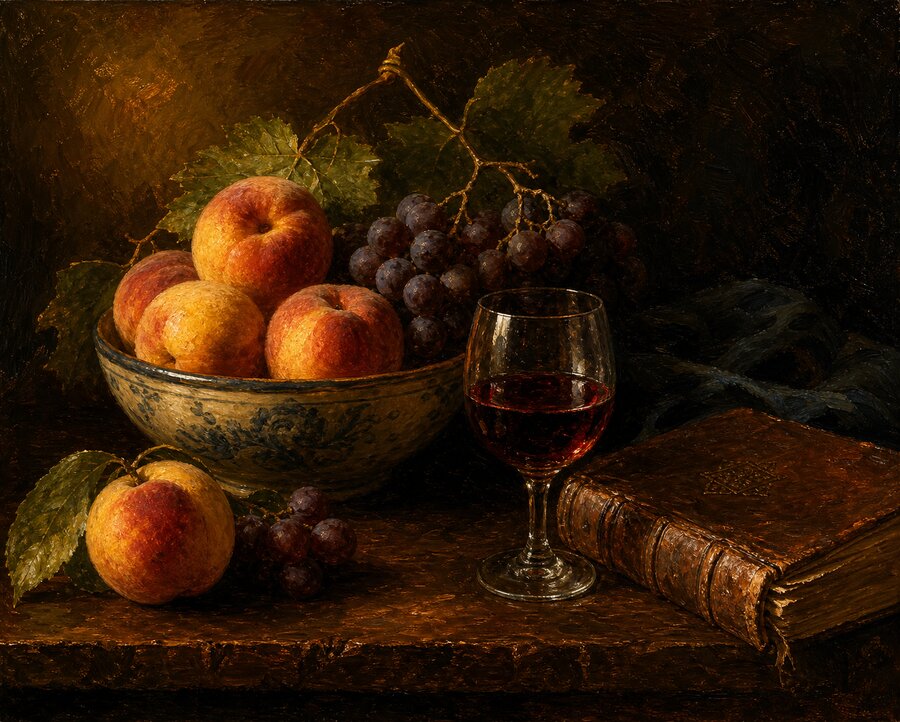
流式事件序列
完整 SSE 事件类型(实测自全参数流式请求):
事件 type | 关键字段 | 含义 |
|---|---|---|
response.created | response.id | 请求创建,获得 response id |
response.in_progress | — | 开始处理 |
response.output_item.added | item.id(ig_…)、output_index | 新建一个 image_generation_call |
response.image_generation_call.in_progress | item_id | 图片生成中 |
response.image_generation_call.generating | item_id | 正在渲染 |
response.image_generation_call.partial_image | partial_image_b64、partial_image_index、output_index、background、output_format | 图片数据(中间帧或最终帧) |
keepalive | sequence_number | 心跳,长时间渲染时出现,用于保持连接 |
response.output_item.done | item.revised_prompt | image_generation_call 完成 |
response.content_part.added / output_text.done / content_part.done | — | 附带的文本消息(生成图片时通常为空串) |
response.completed | response.output[] | 完成,包含最终 output 数组 |
真实事件流(partial_image_b64 已截断):
data: {"type":"response.created","response":{"id":"resp_04a3…","status":"in_progress"}}
data: {"type":"response.in_progress","response":{...}}
data: {"type":"response.output_item.added","item":{"id":"ig_04a3…","type":"image_generation_call","status":"in_progress"},"output_index":0,"sequence_number":2}
data: {"type":"response.image_generation_call.in_progress","item_id":"ig_04a3…","output_index":0,"sequence_number":3}
data: {"type":"response.image_generation_call.generating","item_id":"ig_04a3…","output_index":0,"sequence_number":4}
data: {"type":"response.image_generation_call.partial_image","background":"opaque","item_id":"ig_04a3…","output_format":"webp","output_index":0,"partial_image_b64":"iVBORw0KGgo…<460KB>"}
data: {"type":"keepalive","sequence_number":6}
data: {"type":"response.image_generation_call.partial_image","background":"opaque","output_format":"webp","output_index":0,"partial_image_b64":"UklGRpzTAwB…<380KB>"}
data: {"type":"response.output_item.done","item":{"id":"ig_04a3…","type":"image_generation_call","status":"generating","action":"generate","output_format":"webp","quality":"high","revised_prompt":"…","size":"1024x1536"}}
data: {"type":"response.output_item.added","item":{"id":"msg_04a3…","type":"message","role":"assistant","content":[]},"output_index":1}
data: {"type":"response.content_part.added", ...}
data: {"type":"response.output_text.done","text":""}
data: {"type":"response.content_part.done", ...}
data: {"type":"response.output_item.done","item":{"id":"msg_04a3…","type":"message","status":"completed"}}
data: {"type":"response.completed","response":{"id":"resp_04a3…","status":"completed","output":[…]}}
要点:
- 图片数据位于
partial_image事件的partial_image_b64;partial_image_index标记第几帧(从 0 起),output_index标记第几张图(多图时用于区分,见 一次生成多张)。 - 最终图为最后一个
partial_image,或response.completed中response.output[].result。 partial_image事件附带background与output_format(实测webp生效)。
revised_prompt
用 Responses 生成图片时,gpt-6-astra 会自动优化提示词以提升出图质量,优化后的文本在 revised_prompt:
- 流式:
response.output_item.done事件的item.revised_prompt - 非流式:
output[].revised_prompt
实测:输入 "Draw a serene winter landscape with a river made entirely of white owl feathers winding through snow-dusted pines...",被优化为:
A serene winter landscape in delicate watercolor style: a winding river made entirely of
overlapping white owl feathers flowing through snow-dusted pine trees, under a pale dawn sky
with soft pink and blue washes. Fine ink linework defines the pines, feather barbs, snowy banks,
and distant hills. Peaceful, airy composition, gentle mist, subtle shadows on snow, elegant
natural fantasy illustration.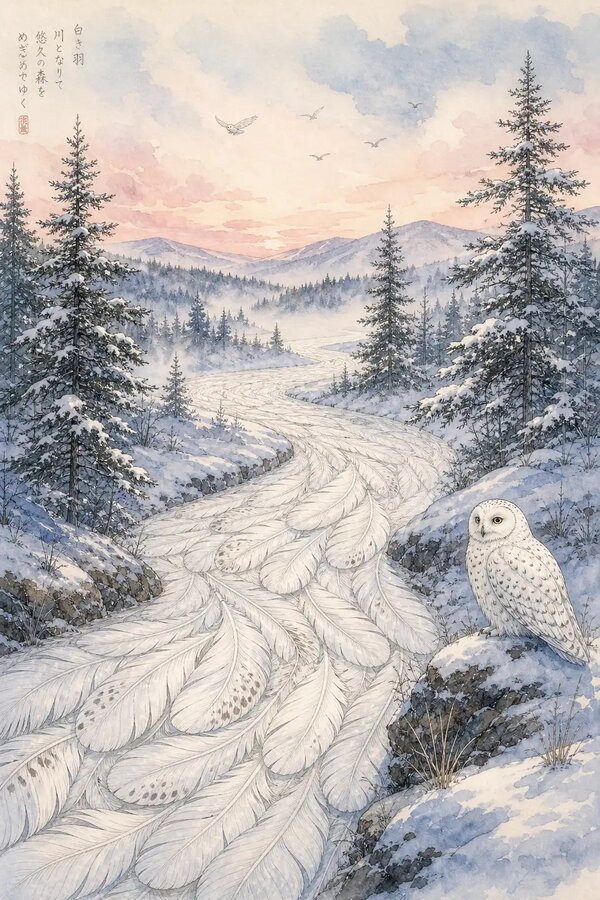
多轮编辑与参考图输入
把参考图通过 input_image 传进去,即可编辑或参考生成。共三种写法:
写法一,URL(公网可直接下载):
{ "type": "input_image", "image_url": "https://your-bucket.example.com/photo.jpg" }写法二,base64 data URI:
import base64
b64 = base64.b64encode(open("photo.jpg", "rb").read).decode
part = {"type": "input_image", "image_url": f"data:image/jpeg;base64,{b64}"}
写法三,file_id(经 Files API 上传):
def create_file(path):
    return client.files.create(file=open(path, "rb"), purpose="vision").id

fid = create_file("photo.jpg")
part = {"type": "input_image", "file_id": fid}
注意:用 URL 时,模型服务器会主动去拉这个地址,所以它必须对上游取图网络可达。浏览器或 VibeAPI 网关本机能得到 HTTP 200,并不代表模型服务器一定能下载。
参考图 URL 可达性实测:
| 参考图输入 | 结果 | 耗时 / 现象 |
|---|---|---|
| 腾讯 COS 公网 URL | 失败 | 约 20 秒返回 400 Unable to download content ... before the timeout |
| 同对象的 EdgeOne CDN URL | 失败 | 约 20 秒返回相同 400 |
| GitHub 公共图片 URL | 成功 | 约 24 秒完成 |
| 图片内联为 base64 data URI | 通过 URL 下载阶段 | 不再出现下载超时;后续仍可能遇到独立的上游负载错误 |
因此,腾讯 COS / EdgeOne CDN、带鉴权或可达性不确定的参考图不要直接传 URL,优先使用 base64 data URI 或 file_id。这类 400 表示上游取图失败,不能据此判断 COS 对象本身损坏或未公开。
action 参数控制生成还是编辑:auto(默认,模型自行决定)、generate(强制新建)、edit(强制编辑,上下文无图则报错)。
蒙版编辑(input_image_mask):原图作为 input_image、蒙版作为 input_image_mask,蒙版的透明区域会被重绘。
img_id  = create_file("sunlit_lounge.png")
mask_id = create_file("mask.png")   # 透明区即重绘区,须包含 alpha 通道

resp = client.responses.create(
    model="gpt-6-astra",
    input=[{"role": "user", "content": [
        {"type": "input_text",  "text": "在泳池里加一只火烈鸟"},
        {"type": "input_image", "file_id": img_id},
    ]}],
    tools=[{"type": "image_generation", "quality": "high",
            "input_image_mask": {"file_id": mask_id}}],
)
参考图编辑实测:
多轮:把上一轮的图传进下一轮
OpenAI 官方 Responses API 支持用 previous_response_id 关联多轮编辑,本网关不支持:传入后流式连接被中断,客户端报 ChunkedEncodingError: Response ended prematurely。
替代方案:将上一轮的图片作为 input_image 显式传入下一轮,即可实现多轮编辑:
# 第一轮:生成
r1_b64 = generate_and_get_b64("一只灰色虎斑猫抱着戴橙色围巾的水獭,童书插画风格")

# 第二轮:将第一轮的图作为参考图传入,继续编辑
stream = client.responses.create(
    model="gpt-6-astra",
    input=[{"role": "user", "content": [
        {"type": "input_text",  "text": "现在把它变成写实摄影风格,浅景深"},
        {"type": "input_image", "image_url": f"data:image/png;base64,{r1_b64}"},
    ]}],
    tools=[{"type": "image_generation"}],
    stream=True,
)
一次生成多张
n 在 Responses 工具中无效。如需多张,请在提示词中写明「生成 N 张」,模型会多次调用 image_generation 工具,每张对应一个递增的 output_index。
stream = client.responses.create(
    model="gpt-6-astra",
    instructions="You are a helpful image generation assistant. Generate ALL images the user requests.",
    input="Generate 3 separate images: 1) a solid purple star, 2) a solid blue square, 3) a solid green triangle, each centered on white.",
    tools=[{"type": "image_generation", "quality": "low"}],
    stream=True,
)

finals = {}
for event in stream:
    if event.type == "response.image_generation_call.partial_image":
        finals[event.output_index] = event.partial_image_b64   # 按 output_index 分组
for idx, b64 in finals.items:
    with open(f"out_{idx}.png", "wb") as f:
        f.write(base64.b64decode(b64))
print(f"共 {len(finals)} 张")   # 实测 3 张
实测(3 张,事件流中出现 3 个 image_generation_call,output_index 为 0 / 1 / 2):



Vision 图片理解
gpt-6-astra 能理解图片:识别物体、颜色、纹理,也能读出图里的文字。做图片理解只需传 input_image、不带 image_generation 工具即可。两个入口:
| 入口 | 端点 | 输出 |
|---|---|---|
| Responses | /v1/responses | 文本(output_text),可同时生成图片 |
| Chat Completions | /v1/chat/completions | 文本(choices[].message.content) |
Responses 方式
resp = client.responses.create(
    model="gpt-6-astra",
    input=[{"role": "user", "content": [
        {"type": "input_text",  "text": "请用中文详细描述这张图片:主要物体、颜色、风格、氛围。"},
        {"type": "input_image", "image_url": "https://your-bucket.example.com/product.png", "detail": "high"},
    ]}],
)
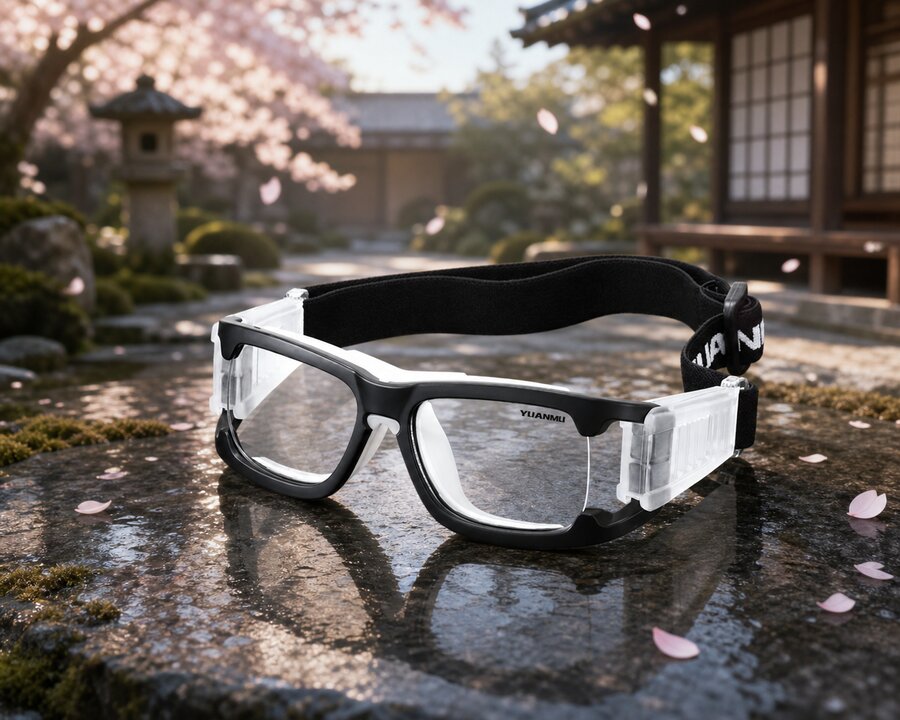
print(resp.output_text)实测输出(护目镜产品图,detail=high,节选):
这张图片展示的是一副运动防护眼镜 / 护目镜式眼镜……镜框前部为方形圆角设计,左右两侧带有透明的防护结构……右侧镜片上可见 "YUANMU" 字样。颜色以黑色、透明白、灰色为主……风格偏向产品摄影 / 电商展示图……
模型准确识别了产品类型、结构、配色、镜片上的英文字样与拍摄风格(usage 约为输入 930、输出 624 token)。
Chat Completions 方式
resp = client.chat.completions.create(
    model="gpt-6-astra",
    messages=[{"role": "user", "content": [
        {"type": "text", "text": "Describe this image: main objects, color palette, mood."},
        {"type": "image_url", "image_url": {"url": "https://.../photo.jpg", "detail": "low"}},
    ]}],
)
print(resp.choices[0].message.content)
两个入口的图片字段写法不同:Responses 使用 input_image 加 image_url(字符串);Chat 使用 image_url 加 image_url.url(对象)。
参考图的三种写法
和生成一样,图片理解也支持 URL、base64、file_id 三种写法(见 多轮编辑与参考图输入)。一个请求可包含多张图片(content 数组中放置多个 input_image)。
detail 精度参数
detail | 说明 |
|---|---|
low | 模型仅接收 512×512 低清版本,速度快、成本低,适用于细节不重要的场景 |
high | 标准高保真,最多 2500 个图块或 2048px 长边 |
original | 适用于大图、密集或空间敏感场景(gpt-5.4 及以后),最多 10000 个图块或 6000px |
auto | 自动选择;在 gpt-6-astra 上等价于 original(不传时也是该行为) |
输入图要求与局限
- 支持格式:PNG、JPEG、WEBP、非动画 GIF
- 限制:单次请求不超过 512MB、最多 1500 张图片;无水印或 logo、无 NSFW 内容、清晰可辨;CAPTCHA 会被系统拦截
- 已知局限:对非拉丁文字(如日文、韩文)的理解可能不佳;小字、旋转或倒置、精确空间定位、物体计数等场景容易出错;不适用于医学影像判读
多语言文字渲染
gpt-image-2 的一项突出能力是在图片中渲染多语言文字(中、英、日、韩等),错字率低,而这正是许多其它图像模型的短板。
下例用一条提示词要求四种语言同框,并明确列出每种语言的确切文字:
A festive vertical New Year greeting poster. Render the SAME greeting in four languages
on four separate, clearly legible lines:
Chinese '新年快乐', English 'Happy New Year',
Japanese 'あけましておめでとう', Korean '새해 복 많이 받으세요'.
Warm red and gold palette, hanging paper lanterns, gold foil accents, elegant typography.
两条路径均成功,四种语言的文字全部正确无误:


提示词建议:
- 逐语言写出确切文字并用引号括住(如
Chinese '新年快乐'),避免让模型自行翻译 - 加入
clearly legible或separate lines等要求,提升可读性与排版 - 文字不宜过多过密,大段文字或极小字号仍可能出错
错误处理
| 状态 / code | 场景 | 应对 |
|---|---|---|
400 Unable to download content ... before the timeout | 上游无法下载参考图 URL | 改用 base64 data URI 或 file_id;不要只以本机 HTTP 200 判断可达性 |
ChunkedEncodingError / 连接中断 | 传了 previous_response_id | 改用「带图进入下一轮」 |
moderation_blocked | 提示词或图片被内容审核拦截 | 修改提示词或输入图后重试 |
429 | 触发限流 | 指数退避后重试 |
401 / 403 | 鉴权失败或无模型权限 | 检查 API_KEY 与 gpt-6-astra 权限 |
内容审核拦截(moderation_blocked)
所有提示词与生成图片都会经过内容审核。被拦截时返回如下结构(可能包含 moderation_details):
{
  "error": {
    "type": "image_generation_user_error",
    "code": "moderation_blocked",
    "moderation_details": {
      "moderation_stage": "input",
      "categories": ["harassment"]
    }
  }
}moderation_stage:input(提示词或输入图被拦)、output(生成图被拦)、unknowncategories:粗粒度标签,例如harassment、self-harm、sexual、violence- 可通过
moderation:"low"(见 image_generation 工具参数 / 输出定制)放宽审核
import openai
try:
    client.images.generate(model="gpt-image-2", prompt="...")
except openai.BadRequestError as e:
    if e.code == "moderation_blocked":
        details = (e.body or {}).get("moderation_details", {})
        print("拦截阶段:", details.get("moderation_stage"), "类别:", details.get("categories"))
        # 提示用户修改后重试;此类用户错误不应自动重试
    else:
        raise
重试策略
- 可重试:
429、5xx(瞬时故障),建议指数退避 - 不可重试:
moderation_blocked等用户错误,必须修改提示词或输入后再发,重复发送无意义
与 OpenAI 官方的差异
| 能力 | OpenAI 官方 | 本网关 | |
|---|---|---|---|
| 流式 / 非流式生成 | 支持 | 事件序列完整 | √ |
| 多图(提示词触发) | 支持 | 返回多个 image_generation_call | √ |
参考图编辑(base64 / file_id) | 支持 | 成功 | √ |
| 参考图编辑(URL) | 支持公网 URL | GitHub 等直链成功;腾讯 COS / EdgeOne URL 下载超时 | ✗ |
revised_prompt | 有 | 一致返回 | √ |
工具 output_format | 遵循 | webp 生效 | √ |
size / quality | 视为约束 | 被改写,要 4K/high 实得 1536×1024/medium | ✗ |
| 指定图像模型 | 工具 model 字段 | 被忽略,不存在的模型名照样出图 | ✗ |
previous_response_id | 支持 | 不支持,连接中断 | ✗ |
Vision 理解(Responses + Chat,detail) | 支持 | 成功 | √ |
background:transparent | gpt-image-2 不支持 | 忽略并输出不透明 | √ |
参数速查
type*               "image_generation"
quality             low | medium | high | auto     (本网关会改写,以响应为准)
size                1024x1024 | 1536x1024 | 1024x1536 | … | auto (同上)
output_format       png | jpeg | webp
output_compression  0–100                          (jpeg / webp)
moderation          auto | low
action              auto | generate | edit
partial_images      0–3
input_image_mask    { "file_id": "..." }
在线调试
填入你自己的 API Key 即可直接发起请求,参数表与响应结构由接口定义生成。
模型填 gpt-6-astra,tools 里加 {"type": "image_generation"}。
Authorization
BearerAuth
使用 Bearer Token 认证。
格式: Authorization: Bearer sk-xxxxxx
In: header
Request Body
application/json
输入内容,可以是字符串或消息数组
"auto" | "disabled"Response Body
application/json
curl -X POST "https://www.vibeapi.cn/v1/responses" \ -H "Content-Type: application/json" \ -d '{ "model": "string" }'{
"id": "string",
"object": "response",
"created_at": 0,
"status": "completed",
"model": "string",
"output": [
{
"type": "string",
"id": "string",
"status": "string",
"role": "string",
"content": [
{
"type": "string",
"text": "string"
}
]
}
],
"usage": {
"prompt_tokens": 0,
"completion_tokens": 0,
"total_tokens": 0,
"prompt_tokens_details": {
"cached_tokens": 0,
"text_tokens": 0,
"audio_tokens": 0,
"image_tokens": 0
},
"completion_tokens_details": {
"text_tokens": 0,
"audio_tokens": 0,
"reasoning_tokens": 0
}
}
}